Remote work gives engineers focus time and flexibility, but it removes the hallway conversations and quick desk visits that keep everyone aligned. On a distributed team, how you communicate matters as much as the code you ship.
I worked as a freelance software engineer through Toptal from 2015 to 2019, building software remotely for clients in healthcare, e-commerce and retail, and have continued working with distributed teams since. These are the habits that make remote work go smoothly, for you and for the people depending on you.
Step 1: Over-Communicate Status
In an office, people can see you're working. Remotely, silence looks like either "everything is fine" or "something is wrong", and people tend to assume the worst. Make your progress visible:
- Post a short daily update, even if your team doesn't require one.
- Flag problems early. "This might take two more days because of X" on Monday is far better than "it's late" on Friday.
- Close the loop. When you finish something someone asked for, tell them; don't just mark the ticket done.
A simple daily update template:
Yesterday: Finished the order-history API, PR #214 is up for review.
Today: Adding pagination to the order list UI.
Blockers: Waiting on the final design for the empty state (asked @design).
Tip
Updates are most useful when they include a link: the PR, the ticket, the doc. Readers can dig in without having to ask you.
Step 2: Default to Async, Use Calls on Purpose
Across time zones, waiting for a meeting slot can cost a whole day. Default to asynchronous communication: written messages, documents, recorded walkthroughs. Then use calls deliberately, when they're genuinely faster:
| Use async (written) for | Use a call for |
|---|---|
| Status updates | Complex or emotional discussions |
| Questions that can wait a few hours | Debugging that needs live back-and-forth |
| Design proposals and feedback | Kick-offs and big decisions |
| Decisions that need a record | Anything going in circles over chat |
Write messages that can be answered in one go: include context, what you've tried, what you need and by when. "Hi, quick question" followed by nothing forces the other person to wait for the real question.
Step 3: Make Time Zones Work for You
Distributed teams rarely share a full working day, so plan around the overlap:
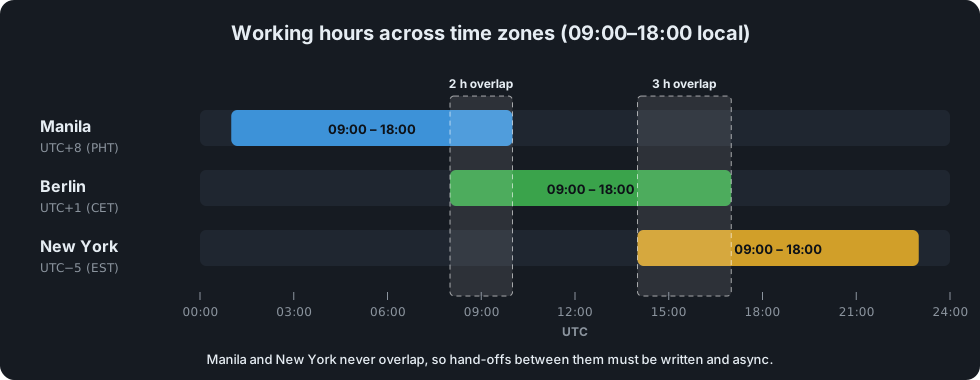
- Know your overlap window with each teammate or client, and keep it free for meetings and live collaboration.
- Prepare questions before the overlap, so it's spent deciding, not discovering.
- Hand off clearly at the end of your day. A good handoff note lets someone in another time zone keep moving while you're offline.
- Write dates and times with the time zone ("Thursday 16:00 PHT / 09:00 CET") to avoid costly mix-ups.
Step 4: Manage Client Expectations
Working directly with clients adds another layer. Clients don't see your editor; they see communication and results. To build trust:
- Clarify requirements in writing before starting, and confirm your understanding back to them.
- Agree on how and when you'll update them: weekly demo, written summary, shared board.
- Explain technical trade-offs in business terms. "This approach ships a week sooner but will need rework if traffic grows tenfold" is easier to decide on than a list of frameworks.
- Raise scope changes immediately, with their impact on time and budget.
- Demo early and often. Showing a rough version early catches misunderstandings while they're cheap to fix.
Note
Clients rarely remember that a feature took an extra day. They do remember being surprised by it.
Step 5: Build a Reliable Work Setup
Remote work depends on a setup you don't have to think about:
- A dedicated workspace, even a small one, that signals "work mode".
- Stable internet with a backup, such as a mobile hotspot for outages.
- A good headset and camera, so calls are easy to follow.
- Secure habits: a password manager, two-factor authentication, encrypted disks and no client data on personal accounts.
Warning
Treat client code and data with the same care you would in an office: use the accounts and tools they provide, never copy data to personal storage, and follow their security policies to the letter.
Step 6: Protect Focus and Boundaries
Without a commute or an office closing time, remote work can spread across your whole day. Some boundaries help:
- Set working hours and show them in your status and calendar.
- Turn off notifications during deep-work blocks, and tell people how to reach you for real emergencies.
- Take real breaks away from the screen.
- Have a shutdown routine: write tomorrow's plan, post your handoff note, close the laptop.
Step 7: Stay Connected to the Team
Remote teams can feel transactional if every conversation is about tickets. Small efforts keep the human side alive:
- Turn your camera on for team meetings when you can.
- Join or start informal channels and occasional non-work chats.
- Say thank you publicly when someone helps you.
- Offer help to newer teammates, especially in their first weeks.
Remote Work Checklist
- Do my teammates and clients know what I'm working on right now?
- Have I flagged every risk or delay as soon as I knew about it?
- Are my messages complete enough to be answered without a follow-up?
- Do my handoff notes let someone continue while I'm offline?
- Are my working hours, focus time and time zone visible to others?
- Am I handling client code and data according to their policies?
Summary
Successful remote engineers aren't just good at coding alone. They make their work visible, communicate in writing clearly enough that others can act without waiting, respect time zones and boundaries, and build trust through steady, predictable delivery. Get those habits right, and distance stops being a disadvantage.