About the code
The code in this guide is illustrative: simplified examples written for this article, not code from client projects. Adapt and test it before using it in production.
Most deployments today are rolling or blue-green: for a few minutes, the old version and the new version of your code run at the same time against the same database. That's what makes deploys zero-downtime. It's also what breaks the naive migration.
Rename customers.name to full_name in one migration, and every request still served by the old version starts failing with column "name" does not exist. Roll back the code, and now the new column name breaks the old code instead.
The fix is a discipline called expand, migrate, contract: never make a change that the currently running code can't handle.
The Rule
At every moment, the database schema must work with both the version of the code that's running now and the version you're about to deploy.
That means a breaking change becomes several small, compatible ones, each shipped separately.
Example: Renaming a Column
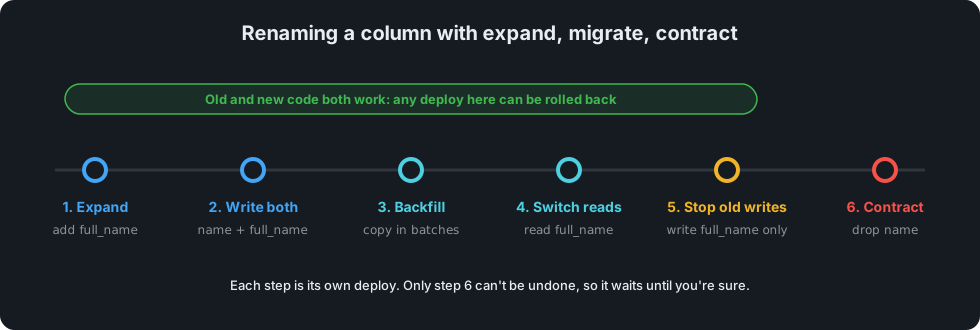
Step 1 – Expand. Add the new column. Nothing reads it yet, so nothing can break.
ALTER TABLE customers ADD COLUMN full_name TEXT;
Step 2 – Write to both. Deploy code that writes name and full_name, but still reads name. Old and new code can run side by side.
await db.customers.update(id, { name: input.name, full_name: input.name });
Step 3 – Backfill. Copy existing data, in batches so you never lock the whole table:
UPDATE customers
   SET full_name = name
 WHERE id IN (
   SELECT id FROM customers WHERE full_name IS NULL AND name IS NOT NULL LIMIT 5000
 );
-- repeat until it updates 0 rows
Step 4 – Switch reads. Deploy code that reads full_name (still writing both, so a rollback is safe).
Step 5 – Stop writing the old column. Once you're confident you won't roll back past Step 4.
Step 6 – Contract. Drop the old column in a later release.
ALTER TABLE customers DROP COLUMN name;
It's six steps instead of one, but every step is boring, and boring is the goal.
The Usual Suspects
| Change | Safe approach |
|---|---|
| Add a nullable column | Safe as is |
Add a NOT NULL column |
Add it nullable with a default, backfill, then add the constraint |
| Rename a column or table | Expand, migrate, contract (above) |
| Change a column's type | Add a new column of the new type, same steps as a rename |
| Drop a column | Stop reading and writing it first, then drop in a later release |
| Add an index on a big table | CREATE INDEX CONCURRENTLY (PostgreSQL) or the online option in your database |
| Add a foreign key | Add it NOT VALID, then VALIDATE CONSTRAINT separately |
Warning
Some "simple" statements take locks that block every write to the table until they finish. On a large, busy table that's an outage. Check what your database locks before running DDL in production, and set a lock_timeout so a migration waits a few seconds at most instead of queueing every other query behind it.
SET lock_timeout = '5s';
ALTER TABLE orders ADD CONSTRAINT orders_customer_fk
  FOREIGN KEY (customer_id) REFERENCES customers (id) NOT VALID;
ALTER TABLE orders VALIDATE CONSTRAINT orders_customer_fk;
Run Migrations Separately From the App
Don't run migrations automatically on every app start: with several instances starting at once, they race each other. Run them as their own step in the pipeline, before the new code rolls out, and make each one safe to run twice.
The same discipline makes slot swaps safe on platforms like Azure App Service: the staging slot and production run the same schema during the swap, so the schema has to suit both.
Test the Rollback, Not Just the Rollout
For every migration, ask: if the deploy right after this goes wrong, can I roll the code back without touching the database? With expand, migrate, contract, the answer is always yes until the final contract step, which is why that step waits until you're sure.
Summary
Zero-downtime deploys require zero-downtime schema changes. Make every change additive first, move the data and the code across in small deploys, and only remove the old shape once nothing uses it. It's slower on paper and much faster in practice, because nothing ever needs a maintenance window or a 2 a.m. rollback.