
Code examples are simplified for this article, not taken from client projects.
When an API gets slow, the first suggestion in the room is usually the biggest one: add a cache, split out a service, shard the database. Sometimes that's right. More often the problem is one missing index or one endpoint that calls the database forty times per request, and the big change adds cost and moving parts without touching it.
Each well-known scaling fix solves one specific problem. The skill is matching the fix to the problem you actually have, and trying the cheap fixes before the expensive ones.
Measure Before You Change Anything
Every other fix is a guess until you can see where the time goes. Before touching the architecture I want three things:
- Latency per endpoint at p95 and p99, not just the average. An average of 120 ms can hide a p99 of 4 seconds.
- A trace of one slow request showing where its time went: database, cache, an external API, or your own code. OpenTelemetry with any tracing backend is enough.
- The database's own view: slow query log, top queries by total time, connection pool usage, CPU and disk.
These usually point at one of a handful of problems, and each has a fix that fits it.
Slow Queries → Indexes
The cheapest fix and the most common cause. A query that scans the whole table is fine with 10,000 rows and painful with 10 million.
EXPLAIN ANALYZE
SELECT id, total, created_at
FROM orders
WHERE customer_id = $1 AND status = 'open'
ORDER BY created_at DESC
LIMIT 20;
-- "Seq Scan on orders" here means it reads every row.

CREATE INDEX CONCURRENTLY orders_customer_status_created
  ON orders (customer_id, status, created_at DESC);
Index the columns your hot queries filter and sort on, in that order. Also look for N+1 patterns, where a list endpoint runs one query per item; one query with a join or an IN (...) is usually the fix. Indexes aren't free (every write has to update them), so add the ones your real queries need, not one per column.
The Same Reads Over and Over → A Cache
If the same data is read far more often than it changes (product details, settings, permission lists), cache it. Cache-aside is the simplest pattern: read the cache, fall back to the database, store the result with a TTL.
async function getProduct(id: string): Promise<Product> {
  const key = `product:${id}`;
  const cached = await redis.get(key);
  if (cached) return JSON.parse(cached);

  const product = await db.products.findById(id);
  await redis.set(key, JSON.stringify(product), { EX: 300 }); // 5 minutes
  return product;
}

// On update, delete the key so the next read loads fresh data.
async function updateProduct(id: string, changes: Partial<Product>) {
  await db.products.update(id, changes);
  await redis.del(`product:${id}`);
}
The hard part is staleness: decide how old the data is allowed to be and set the TTL from that. Don't cache something until you've fixed its query; a cache in front of a slow query just hides the problem until the cache is cold.
Large Files Through Your Servers → Object Storage and a CDN
Uploads, downloads, images and reports shouldn't pass through your API servers. Store them in object storage (S3, Azure Blob Storage), let clients upload directly with a short-lived signed URL, and serve them through a CDN close to the user. Your servers stop spending memory and bandwidth on bytes they never needed to touch.
Reads Overloading the Database → Read Replicas
When the database is busy mostly with reads, and indexes and caching aren't enough, add read replicas and send heavy reads (reports, search, list pages) to them.
The catch is replication lag: a replica can be a little behind the primary. A user who saves a change and is immediately shown a page read from a replica may not see it. Send reads that must reflect the user's own latest write to the primary, and everything else to replicas.
Spiky or Slow Work in the Request → A Queue
If a request does slow work the user doesn't need to wait for (sending email, generating a PDF, calling a slow partner API), put a job on a queue and return straight away. Workers process jobs at a steady rate, so a spike of 10,000 requests becomes a backlog that drains, not 10,000 requests all hitting the database at once.
app.post("/reports", async (req, res) => {
  const job = await reportsQueue.add("generate", { userId: req.user.id, range: req.body.range });
  res.status(202).json({ jobId: job.id, status: "queued" });
});
If the job must only run when the database change commits, publish it with the transactional outbox so a crash between the two can't lose it.
One Server Isn't Enough → Scale Out Behind a Load Balancer
When a single instance runs out of CPU, run several behind a load balancer. That only works if the instances are stateless: no sessions in memory, no files on local disk, no in-process caches that must agree with each other. Moving that state into the database, Redis or object storage is most of the work; the load balancer itself is the easy part.
Protecting the System From Its Callers
Some problems aren't about capacity but about what comes in:
- Too many requests from one client → rate limiting per user or API key, returning
429 Too Many Requestswith aRetry-Afterheader. - Duplicate requests from retries and double clicks → an
Idempotency-Keyheader, so the second "charge this card" returns the first result instead of charging twice. - A slow or failing dependency → timeouts, retries with backoff and jitter, and circuit breakers, covered in Timeouts, Retries and Circuit Breakers.
These are cheap to add and prevent whole classes of outages, so I add them early rather than waiting for a problem.
Writes Outgrow One Database → Shard, Last
Sharding splits data across several databases by a key, such as customer or tenant ID. It's the right answer when one primary can no longer handle the write volume or hold the data. It's also the most expensive change on this list: queries across shards get hard, transactions across shards mostly disappear, and moving data between shards is a project of its own.
Before sharding, check the cheaper options: a bigger database server, archiving old rows, partitioning large tables inside one database, and moving write-heavy features (logs, events, analytics) to a store built for them. If you do shard, pick a key that keeps one customer's data together, so most requests only ever touch one shard.
Symptom to Fix
| Symptom | Check first | Usual fix |
|---|---|---|
| One endpoint is slow | Trace, EXPLAIN ANALYZE |
Index, remove N+1 queries |
| Same data read constantly | Top queries by count | Cache with a TTL |
| Servers busy moving files | Bandwidth, response sizes | Object storage + CDN |
| Database busy with reads | Read/write ratio | Read replicas |
| Spikes overload the database | Requests per second over time | Queue + workers |
| App servers at full CPU | CPU per instance | Stateless instances + load balancer |
| Writes overload the primary | Write volume, data size | Bigger server, partitioning, then sharding |
Summary
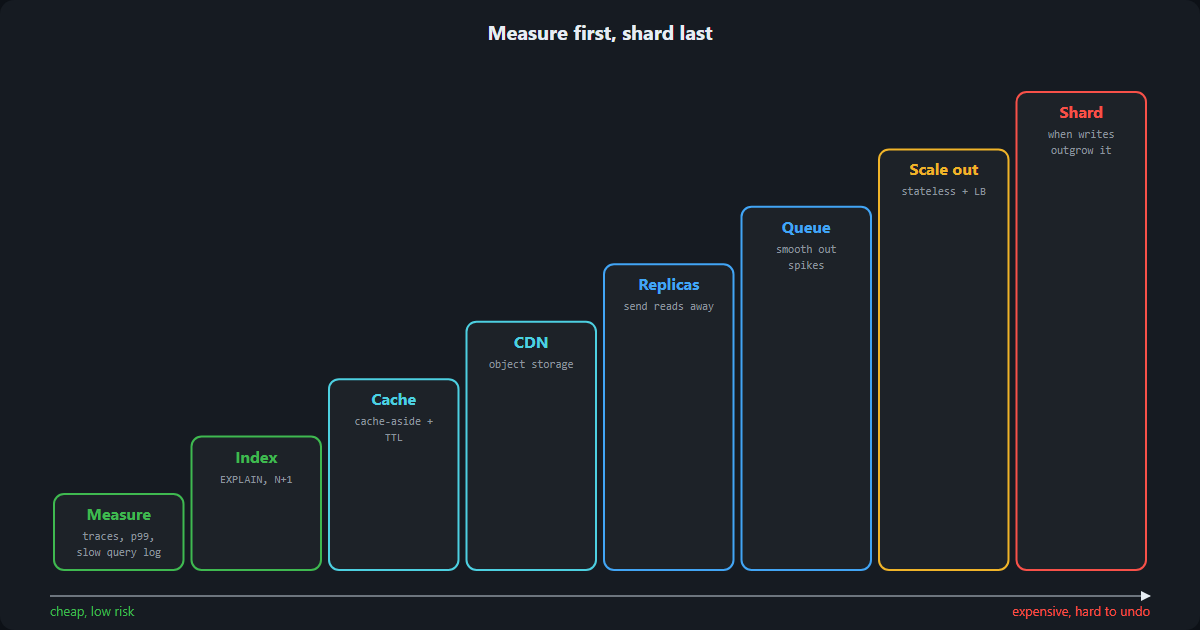
Measure first, so you know which problem you have. Then work up from the cheapest fix: indexes, caching, a CDN, read replicas, queues, more instances, and sharding last. Most systems never need the top of the list, and the ones that do get there with clear evidence of why.
This post started from a "System Design in 12 Lines" cheat sheet by @husnainizhar on LinkedIn, which makes the same point: start by measuring.