

JSON Web Tokens (JWTs) are the most common way to authenticate requests to a modern API. They're also easy to get subtly wrong: tokens that never expire, secrets checked into Git, or tokens stored where any script on the page can read them.
This guide builds a small but production-minded setup in Express and TypeScript:
- a short-lived access token sent in the
Authorizationheader, - a long-lived refresh token stored in an
httpOnlycookie and rotated on every use, - a middleware that protects routes,
- and a logout that actually logs you out.
How the Flow Works
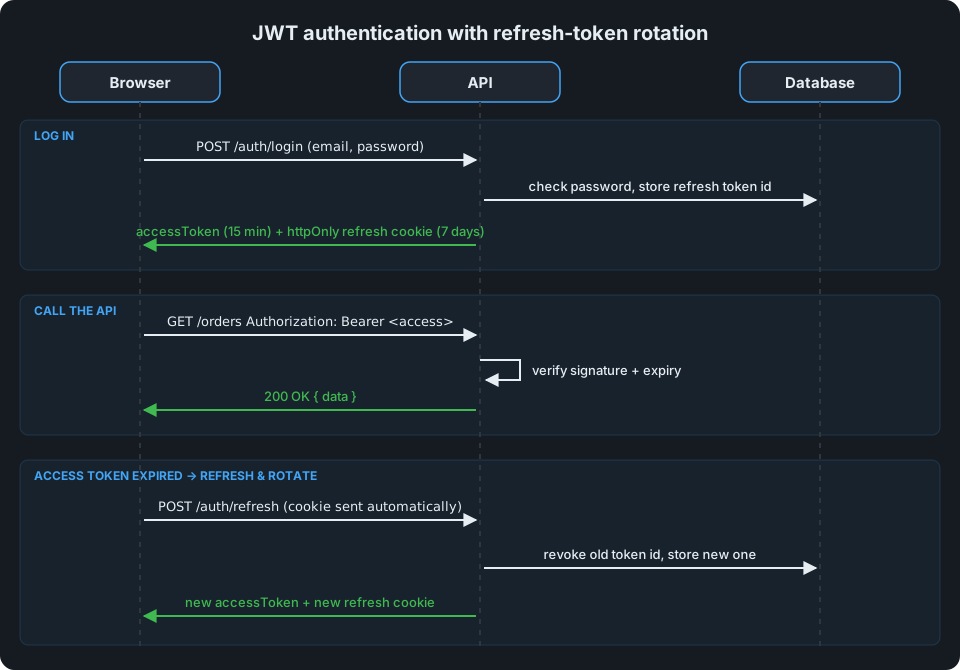
- The user logs in with email and password.
- The API returns an access token (valid for 15 minutes) in the response body and sets a refresh token (valid for 7 days) as an
httpOnlycookie. - The client sends the access token with each request:
Authorization: Bearer <token>. - When the access token expires, the client calls
/auth/refresh. The browser sends the cookie automatically, and the API returns a new access token plus a new refresh token. - On logout, the API revokes the refresh token and clears the cookie.
Note
Why two tokens? A stolen access token is only useful for a few minutes. The refresh token lives longer, but JavaScript can't read it (it's httpOnly), and the server can revoke it.
Step 1: Install the Packages
npm install express jsonwebtoken bcrypt cookie-parser
npm install -D typescript @types/express @types/jsonwebtoken @types/bcrypt @types/cookie-parser
Step 2: Keep Secrets Out of Your Code
Use separate secrets for access and refresh tokens, load them from the environment, and fail fast if they're missing:
// config.ts
function required(name: string): string {
  const value = process.env[name];
  if (!value) throw new Error(`Missing environment variable ${name}`);
  return value;
}

export const config = {
  accessSecret: required("JWT_ACCESS_SECRET"),
  refreshSecret: required("JWT_REFRESH_SECRET"),
};
Generate strong secrets with:
node -e "console.log(require('crypto').randomBytes(64).toString('hex'))"
Warning
Never commit secrets to Git, and never reuse the same secret for both token types. If one leaks, rotate it immediately; every token signed with it becomes forgeable.
Step 3: Create Token Helpers
// tokens.ts
import crypto from "node:crypto";
import jwt from "jsonwebtoken";
import { config } from "./config";

export type AccessPayload = { sub: string; role: "user" | "admin" };

export function signAccessToken(payload: AccessPayload) {
  return jwt.sign(payload, config.accessSecret, { algorithm: "HS256", expiresIn: "15m" });
}

export function verifyAccessToken(token: string): AccessPayload {
  // Pin the algorithm so a token can't choose its own (e.g. "none").
  return jwt.verify(token, config.accessSecret, { algorithms: ["HS256"] }) as AccessPayload;
}

export function signRefreshToken(userId: string) {
  // jti = unique token id, used to revoke and rotate refresh tokens.
  const jti = crypto.randomUUID();
  const token = jwt.sign({ sub: userId, jti }, config.refreshSecret, { algorithm: "HS256", expiresIn: "7d" });
  return { token, jti };
}

export function verifyRefreshToken(token: string) {
  return jwt.verify(token, config.refreshSecret, { algorithms: ["HS256"] }) as { sub: string; jti: string };
}
Keep the payload small and non-sensitive. A JWT is signed, not encrypted: anyone holding it can base64-decode the payload and read it. User ID and role are fine; email addresses, permissions lists and personal data are not.
Step 4: Build the Login Route
// auth.routes.ts
import { Router, type Response } from "express";
import bcrypt from "bcrypt";
import { signAccessToken, signRefreshToken } from "./tokens";
import { db } from "./db";

export const auth = Router();

const REFRESH_COOKIE = "refresh_token";
const SEVEN_DAYS = 7 * 24 * 60 * 60 * 1000;

async function issueTokens(res: Response, user: { id: string; role: "user" | "admin" }) {
  const accessToken = signAccessToken({ sub: user.id, role: user.role });
  const { token: refreshToken, jti } = signRefreshToken(user.id);

  // Store only the token id, so refresh tokens can be revoked server-side.
  await db.refreshTokens.create({ jti, userId: user.id, expiresAt: new Date(Date.now() + SEVEN_DAYS) });

  res.cookie(REFRESH_COOKIE, refreshToken, {
    httpOnly: true,                                   // not readable from JavaScript
    secure: process.env.NODE_ENV === "production",    // HTTPS only in production
    sameSite: "strict",
    path: "/auth",                                    // only sent to auth routes
    maxAge: SEVEN_DAYS,
  });
  return accessToken;
}

auth.post("/login", async (req, res) => {
  const { email, password } = req.body ?? {};
  const user = await db.users.findByEmail(String(email ?? ""));

  // Same response for "no such user" and "wrong password", so attackers can't probe for emails.
  const ok = user && (await bcrypt.compare(String(password ?? ""), user.passwordHash));
  if (!ok) return res.status(401).json({ error: { code: "invalid_credentials", message: "Invalid email or password." } });

  const accessToken = await issueTokens(res, user);
  res.json({ accessToken });
});
Passwords are stored as bcrypt hashes, never in plain text. When creating users, hash with await bcrypt.hash(password, 12).
Step 5: Protect Routes with Middleware
// requireAuth.ts
import type { RequestHandler } from "express";
import { verifyAccessToken, type AccessPayload } from "./tokens";

declare global {
  namespace Express {
    interface Request {
      user?: AccessPayload;
    }
  }
}

export const requireAuth: RequestHandler = (req, res, next) => {
  const header = req.headers.authorization ?? "";
  const [scheme, token] = header.split(" ");
  if (scheme !== "Bearer" || !token) {
    return res.status(401).json({ error: { code: "unauthorized", message: "Missing access token." } });
  }
  try {
    req.user = verifyAccessToken(token);
    next();
  } catch {
    // Covers expired, tampered and malformed tokens.
    res.status(401).json({ error: { code: "invalid_token", message: "Access token is invalid or expired." } });
  }
};

export const requireRole =
  (role: AccessPayload["role"]): RequestHandler =>
  (req, res, next) =>
    req.user?.role === role
      ? next()
      : res.status(403).json({ error: { code: "forbidden", message: "You don't have access to this resource." } });
Use it on any route:
app.get("/me", requireAuth, (req, res) => res.json({ id: req.user!.sub }));
app.delete("/users/:id", requireAuth, requireRole("admin"), deleteUser);
Tip
Return 401 when the caller isn't authenticated and 403 when they're authenticated but not allowed. Clients handle the two very differently: 401 means "refresh or log in again", 403 means "don't retry".
Step 6: Refresh and Rotate Tokens
Each refresh token works once. When it's used, the server revokes it and issues a new pair. If an old token is ever presented again, someone has a copy they shouldn't, so revoke every session for that user:
auth.post("/refresh", async (req, res) => {
  const token = req.cookies?.[REFRESH_COOKIE];
  if (!token) return res.status(401).json({ error: { code: "unauthorized", message: "No refresh token." } });

  let payload: { sub: string; jti: string };
  try {
    payload = verifyRefreshToken(token);
  } catch {
    return res.status(401).json({ error: { code: "invalid_token", message: "Refresh token is invalid or expired." } });
  }

  const stored = await db.refreshTokens.find(payload.jti);
  if (!stored || stored.revokedAt) {
    // Reuse of a rotated or revoked token: assume theft and end all sessions.
    await db.refreshTokens.revokeAllForUser(payload.sub);
    res.clearCookie(REFRESH_COOKIE, { path: "/auth" });
    return res.status(401).json({ error: { code: "token_reused", message: "Please log in again." } });
  }

  await db.refreshTokens.revoke(payload.jti);
  const user = await db.users.findById(payload.sub);
  if (!user) return res.status(401).json({ error: { code: "unauthorized", message: "Account not found." } });

  const accessToken = await issueTokens(res, user);
  res.json({ accessToken });
});
Register cookie-parser before the routes so req.cookies is populated:
import express from "express";
import cookieParser from "cookie-parser";
import { auth } from "./auth.routes";

const app = express();
app.use(express.json());
app.use(cookieParser());
app.use("/auth", auth);
Step 7: Log Out Properly
Deleting the access token on the client isn't enough; the refresh token would still work. Revoke it on the server and clear the cookie:
auth.post("/logout", async (req, res) => {
  const token = req.cookies?.[REFRESH_COOKIE];
  if (token) {
    try {
      const { jti } = verifyRefreshToken(token);
      await db.refreshTokens.revoke(jti);
    } catch {
      // Already invalid; nothing to revoke.
    }
  }
  res.clearCookie(REFRESH_COOKIE, { path: "/auth" });
  res.status(204).end();
});
Where Should the Client Store the Access Token?
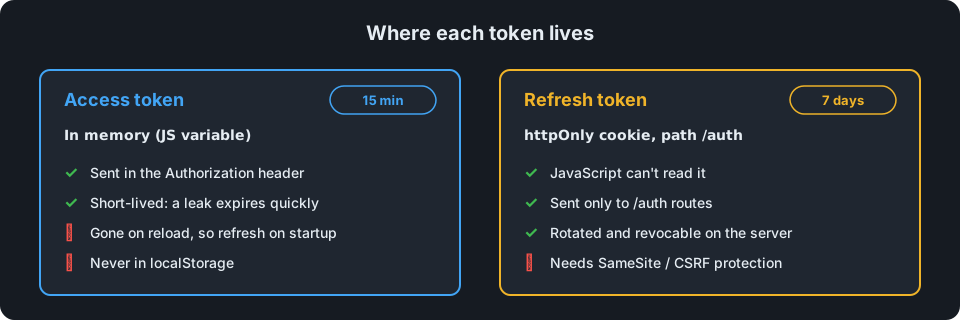
Keep the access token in memory (a variable or your state store), not in localStorage. Anything in localStorage can be read by any script running on your page, so a single XSS bug would leak it.
Because it's only in memory, the token disappears on page reload. That's fine: on startup, the app calls /auth/refresh, the browser sends the httpOnly cookie, and the user gets a fresh access token without logging in again.
Warning
Cookie-based refresh needs CSRF protection. sameSite: "strict", limiting the cookie to /auth and only accepting POST on refresh cover the common cases. If your frontend and API live on different sites, you'll need sameSite: "none" plus a CSRF token instead.
Security Checklist
- Access tokens expire in minutes, refresh tokens in days.
- Separate, strong secrets loaded from the environment.
- The algorithm is pinned when verifying tokens.
- No sensitive data in token payloads.
- Refresh tokens are
httpOnly,secure,sameSite, and rotated on every use. - Reused refresh tokens revoke all sessions for that user.
- Logout revokes the refresh token server-side.
- Login errors don't reveal whether an email exists, and login is rate-limited (for example with
express-rate-limit). - Everything runs over HTTPS.
With these pieces in place, you have authentication that's simple to use from any client and resilient to the most common token attacks.