

Shipping an API is easy. Changing it a year later, when a web app, two mobile apps and a partner integration all depend on it, is the hard part. Mobile users don't update the day you deploy, and partners rarely redeploy on your schedule, so every response you've ever returned is effectively a promise.
This guide walks through the rules I use to keep that promise while still moving fast. The examples use Node.js and Express with TypeScript, but the ideas apply to any stack.
What Counts as a "Breaking" Change?
Before you can avoid breaking changes, you need a shared definition. Anything that can make a correct, existing client fail is breaking:
| Change | Breaking? |
|---|---|
| Adding a new endpoint | No |
| Adding an optional request field | No |
| Adding a field to a response | No (if clients ignore unknown fields) |
| Removing or renaming a response field | Yes |
Changing a field's type ("42" → 42) |
Yes |
| Making an optional request field required | Yes |
| Changing error codes or status codes | Yes |
| Tightening validation (e.g. shorter max length) | Yes |
Tip
Write this table into your team's API guidelines. Code reviews go much faster when "is this breaking?" has an agreed answer.
Step 1: Only Make Additive Changes
The safest change is one that only adds. Need a customer's full name split into parts? Don't replace name with firstName and lastName. Add the new fields and keep the old one:
{
  "id": "cus_8f2k",
  "name": "Maria Santos",
  "firstName": "Maria",
  "lastName": "Santos"
}
Old clients keep reading name. New clients use the new fields. You remove name later, through the deprecation process in Step 6, not in the same release.
Step 2: Design Responses as Objects, Not Bare Values
A bare array can never grow. This response has nowhere to put pagination info, warnings or totals:
[{ "id": 1 }, { "id": 2 }]
Wrap collections in an object from day one:
{
  "data": [{ "id": 1 }, { "id": 2 }],
  "nextCursor": "eyJpZCI6Mn0"
}
Now adding total or warnings later is an additive change instead of a breaking one.
Step 3: Use a Consistent Error Format
Clients write code against your errors too. If one endpoint returns { "error": "Not found" } and another returns { "message": "...", "code": 404 }, every client ends up with special cases.
Pick one shape and use it everywhere. A simple version:
type ApiError = {
  error: {
    code: string;        // stable, machine-readable: "customer_not_found"
    message: string;     // human-readable, can change freely
    details?: unknown;   // optional, e.g. per-field validation errors
  };
};
Then enforce it with a single error handler instead of hand-writing responses in each route:
import type { ErrorRequestHandler } from "express";

export class HttpError extends Error {
  constructor(
    public status: number,
    public code: string,
    message: string,
    public details?: unknown,
  ) {
    super(message);
  }
}

export const errorHandler: ErrorRequestHandler = (err, _req, res, _next) => {
  if (err instanceof HttpError) {
    return res.status(err.status).json({
      error: { code: err.code, message: err.message, details: err.details },
    });
  }
  console.error(err);
  res.status(500).json({ error: { code: "internal_error", message: "Something went wrong." } });
};
Note
Clients should branch on code, never on message. That lets you improve wording without breaking anyone.
Step 4: Paginate Everything That Can Grow
An endpoint that returns "all orders" works fine with 50 orders and falls over with 500,000. Adding pagination later changes the response, so add it up front, even if the first version only ever returns one page.
Cursor pagination is usually the better default because it stays correct when rows are inserted while a client is paging:
app.get("/orders", async (req, res) => {
  const limit = Math.min(Number(req.query.limit) || 20, 100);
  const cursor = req.query.cursor ? decodeCursor(String(req.query.cursor)) : undefined;

  const rows = await db.orders.findMany({
    where: cursor ? { id: { gt: cursor.id } } : undefined,
    orderBy: { id: "asc" },
    take: limit + 1, // fetch one extra to know if there's another page
  });

  const page = rows.slice(0, limit);
  res.json({
    data: page,
    nextCursor: rows.length > limit ? encodeCursor({ id: page[page.length - 1].id }) : null,
  });
});
encodeCursor and decodeCursor can be as simple as base64-encoded JSON. Treat cursors as opaque strings in your docs so you're free to change what's inside them.
Step 5: Make Writes Safe to Retry
Mobile networks drop requests constantly. If a client sends POST /payments, times out, and retries, you don't want to charge the customer twice.
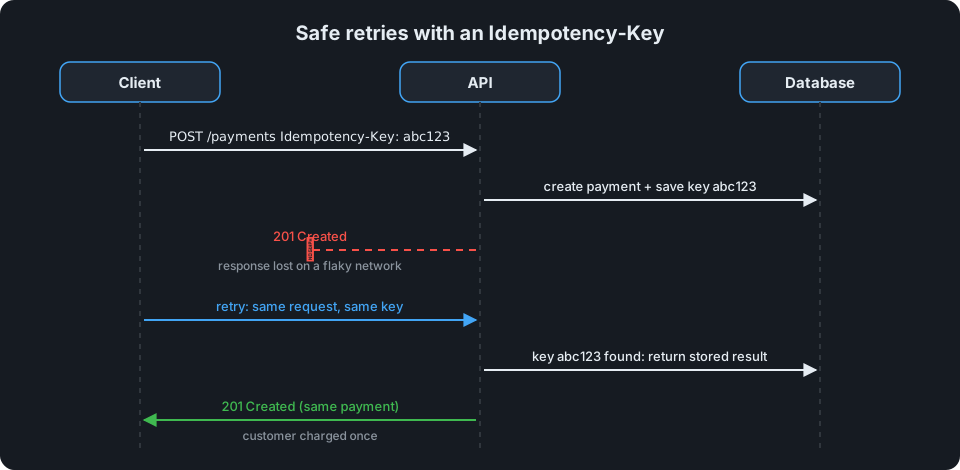
An idempotency key solves this. The client generates a unique key per operation and sends it in a header; the server stores the first result and replays it for any retry with the same key:
app.post("/payments", async (req, res, next) => {
  try {
    const key = req.header("Idempotency-Key");
    if (!key) throw new HttpError(400, "idempotency_key_required", "Send an Idempotency-Key header.");

    const previous = await db.idempotency.find(key);
    if (previous) return res.status(previous.status).json(previous.body);

    const payment = await createPayment(req.body);
    await db.idempotency.save(key, { status: 201, body: payment });
    res.status(201).json(payment);
  } catch (err) {
    next(err);
  }
});
Warning
In production, save the key and create the payment inside the same database transaction (or lock on the key first). Otherwise two retries arriving at the same moment can both slip past the lookup.
Step 6: Deprecate Before You Remove
When something really has to go, give clients time and a signal:
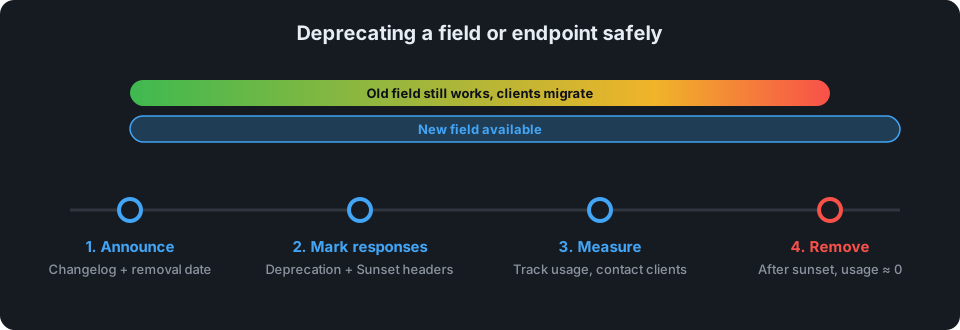
- Announce it in your changelog with a removal date.
- Mark responses with a
Deprecationheader (RFC 9745) and aSunsetheader (RFC 8594) carrying the removal date, so client developers see it in their logs. - Measure usage. Log which API keys still call the old field or endpoint, and contact them directly.
- Remove it only after the date has passed and usage has dropped to (near) zero.
app.get("/v1/customers/:id", (req, res, next) => {
  res.set("Deprecation", "@1767225600"); // deprecated since 2026-01-01 (Unix time, RFC 9745)
  res.set("Sunset", "Wed, 31 Mar 2027 23:59:59 GMT"); // removal date (HTTP-date, RFC 8594)
  res.set("Link", '</v2/customers>; rel="successor-version"');
  next();
});
Step 7: Version Only When You Must
Versioning (/v1/..., /v2/...) is a tool for genuinely incompatible redesigns, not for every change. Each live version is code you have to maintain, test and secure. If you follow Steps 1 through 6, you'll need a new major version rarely.
When you do need one:
- Put the version in the URL (
/v2/orders). It's the easiest for clients to see, log and debug. - Run both versions side by side and share as much code as possible underneath.
- Apply the same deprecation process from Step 6 to the old version.
Quick Checklist
Before merging an API change, ask:
- Does it only add things?
- Will old clients that ignore unknown fields still work?
- Are errors returned in the standard format with a stable
code? - Does any new list endpoint paginate?
- Are new write endpoints safe to retry?
- If something is being removed, is it deprecated with a date and usage tracking?
Get those right and your API can keep evolving for years without a single "why did the app stop working?" incident.